

Danh mục bài viết
Toggle1. Giới thiệu về Redux
Redux là một thư viện quản lý trạng thái phổ biến cho các ứng dụng JavaScript, đặc biệt là React. Redux giúp giải quyết vấn đề quản lý trạng thái trong ứng dụng, đặc biệt khi ứng dụng trở nên phức tạp và có nhiều thành phần cần chia sẻ dữ liệu. Bằng cách sử dụng Redux, bạn có thể quản lý trạng thái toàn cục một cách có tổ chức, giúp code dễ bảo trì và mở rộng hơn.
- Quản lý trạng thái phức tạp: Khi ứng dụng lớn lên, việc quản lý trạng thái giữa các component sẽ trở nên khó khăn hơn. Redux giúp tập trung hóa trạng thái tại một nơi (store) để dễ quản lý.
- Tránh props drilling: Trong một số trường hợp, bạn phải truyền dữ liệu qua nhiều component trung gian, gây khó khăn cho việc bảo trì. Redux cho phép truy cập trạng thái từ bất kỳ component nào mà không cần thông qua props
- Cải thiện khả năng gỡ lỗi: Redux có các công cụ như Redux DevTools giúp theo dõi các thay đổi trạng thái trong thời gian thực.
2. Các khái niệm cơ bản của Redux
Redux có một số khái niệm quan trọng bạn cần nắm rõ:
Store: Là nơi lưu trữ toàn bộ trạng thái của ứng dụng. Chỉ có một store duy nhất trong mỗi ứng dụng Redux.
State: Trạng thái ứng dụng được lưu trữ dưới dạng một đối tượng JavaScript.
Actions: Là các đối tượng chứa thông tin về loại hành động và dữ liệu cần thay đổi. Chúng được gửi đi để yêu cầu thay đổi trạng thái.
const incrementAction = { type: 'INCREMENT' };
Reducers: Là các hàm thuần (pure functions) nhận vào state hiện tại và một action, sau đó trả về state mới dựa trên action đó.
					function counterReducer(state = 0, action) {
  switch (action.type) {
    case 'INCREMENT':
      return state + 1;
    case 'DECREMENT':
      return state - 1;
    default:
      return state;
  }
}
Dispatch: Là cách để gửi một action tới store, yêu cầu store cập nhật trạng thái.
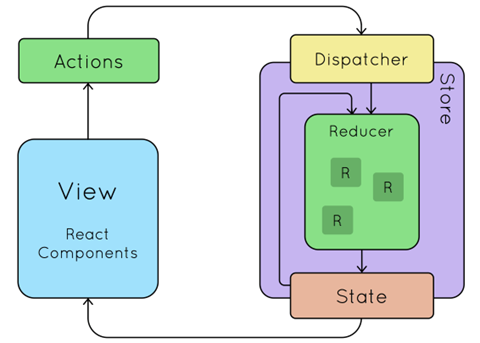
Nguồn: https://www.ifourtechnolab.com/blog/a-step-by-step-guide-on-using-redux-toolkit-with-react
3. Tích hợp Redux vào react
Để sử dụng Redux trong React, bạn cần các bước sau:
Bước 1: Cài đặt Redux và React-Redux
Cài đặt Redux và React-Redux để bắt đầu tích hợp vào dự án React:
npm install @reduxjs/toolkit react-redux
Bước 2: Tạo Store
Tạo một store để quản lý trạng thái toàn cục của ứng dụng:
					import { configureStore } from '@reduxjs/toolkit';
import counterReducer from './features/counter/counterSlice';

const store = configureStore({
  reducer: {
    counter: counterReducer,
  },
});

export default store;
Bước 3: Tạo Slice
Redux Toolkit giới thiệu khái niệm “slice” giúp quản lý các phần trạng thái của ứng dụng dễ dàng hơn.
					import { createSlice } from '@reduxjs/toolkit';

const counterSlice = createSlice({
  name: 'counter',
  initialState: 0,
  reducers: {
    increment: (state) => state + 1,
    decrement: (state) => state - 1,
  },
});

export const { increment, decrement } = counterSlice.actions;
export default counterSlice.reducer;
Bước 4: Kết nối Redux với React
Sử dụng Provider từ react-redux để kết nối store với các component React.
					import React from 'react';
import ReactDOM from 'react-dom';
import { Provider } from 'react-redux';
import store from './store';
import App from './App';

ReactDOM.render(
  <Provider store={store}>
    <App />
  </Provider>,
  document.getElementById('root')
);
4. Sử dụng Redux trong các Component React
Để lấy dữ liệu từ Redux store hoặc gửi action, bạn sử dụng các hook useSelector và useDispatch.
useSelector – Lấy trạng thái từ Store
					import { useSelector } from 'react-redux';

const CounterDisplay = () => {
  const count = useSelector((state) => state.counter);
  return <div>Count: {count}</div>;
};
useDispatch – Gửi Action để thay đổi trạng thái
					import { useDispatch } from 'react-redux';
import { increment, decrement } from './features/counter/counterSlice';

const CounterButtons = () => {
  const dispatch = useDispatch();
  return (
    <div>
      <button onClick={() => dispatch(increment())}>Increase</button>
      <button onClick={() => dispatch(decrement())}>Decrease</button>
    </div>
  );
};
5. Lợi ích của Redux
- Tập trung hóa quản lý trạng thái, giúp dễ dàng theo dõi và duy trì.
- Công cụ gỡ lỗi mạnh mẽ.
- Hỗ trợ các middleware như Redux Thunk hoặc Redux Saga để xử lý các tác vụ bất đồng bộ.
6. hạn chế của Redux
- Tốn công thiết lập ban đầu, đặc biệt với các ứng dụng nhỏ.
- Code có thể trở nên phức tạp nếu không tổ chức hợp lý.
7. Khi nào nên và không nên sử dụng Redux
- Nên sử dụng Redux khi ứng dụng cần quản lý nhiều trạng thái toàn cục hoặc có các luồng dữ liệu phức tạp.
- Không nên sử dụng Redux nếu chỉ có vài trạng thái đơn giản có thể quản lý dễ dàng bằng useState hoặc useContext.
8. Kết luận
Redux là một công cụ hữu ích để quản lý trạng thái phức tạp trong ứng dụng React. Với Redux Toolkit, bạn có thể làm việc với Redux một cách dễ dàng hơn và tránh được nhiều vấn đề tiềm ẩn. Nếu bạn mới bắt đầu, hãy thử tạo một ứng dụng đơn giản với Redux để hiểu rõ hơn về cách hoạt động của nó.
Ở trên là 1 số chia sẻ về redux trong react của mình, vì đây đa phần là kiến thức mình tự học nên có thể bài viết này có thể có nhiều chỗ chưa chính xác và thiếu sót, mong mọi người góp ý ở dưới phần bình luận để bài viết thêm hoàn chỉnh và xây dựng một cộng đồng nơi mọi người có thể chia sẻ kinh nghiệm lập trình cho nhau 😘.


 By
By
 By
By

